Category: Resources for Writing and Self Publishing
Social Media Success Summit 2015
I recently finished going through all of the webinar recordings for the 7th annual Social Media Success Summit 2015 presented by SocialMediaExaminer.com, and it was a marathon of online education. A success marathon!
To successfully self publish a book (meaning sell books), an author has to find ways of marketing a self-published book online. Social media marketing seemed to me like the most accessible and effective book marketing for self-published authors, so social media marketing education came to the top of my To Do list in 2015.
Social media – and much of social media marketing – is free, like a puppy is free. I heard that phrase from someone else and immediately adopted it. It was so cute. But as soon as I got home with my social media, I realized that I was going to need resources and advice. I needed to join a club or a group who knew what I needed to know.
I first discovered SocialMediaExaminer.com through Michael Stelzner’s podcast “Social Media Marketing Podcast” which led me to join the Social Media Marketing Society and their monthly series of online social media education webinars. The SMSS15 format of live webinars throughout the month of October 2015, which would then be available as recordings for 18 months from the date I paid for the Summit, was ideal for my schedule. The recordings are supported with an audio file, transcript, and downloadable PDF slide deck. This is exactly how I like to learn; at my own pace, at any time of the day or night. So I did what I almost never do – I signed up and paid $347 for 36 hour-long webinars and it was definitely worth it.
The webinars were centered on social media platforms and analytics, with several devoted to content creation and online tools. Each instructor gave their own take on how to plan and deliver content. I watched and studied every webinar – even the ones that focused on tasks I may not be doing in my upcoming year of self-published book marketing. I went to every presenter’s website and followed, liked, subscribed, bookmarked, and circled him or her. If they had a podcast, I subscribed to that too and listened.
If I had wanted to engage socially, there were places I could have participated, but I did only a small amount of that because I am in my learning phase (and hopelessly introverted). SMSS15 gave me the education level I was looking for. Social Media Examiner hosts a big live conference each year where the big live social part of social media takes center stage. For now, that’s beyond my scope.
If I was already an expert in Facebook advertising, LinkedIn influencing and advertising, Google Analytics, video creation and marketing, Twitter and Google+ and Pintrest and Instagram and Youtube marketing and analytics, then SMSS15 wouldn’t have been as valuable to me as it was. But in addition to education on all of those topics – there was information about the latest online tools. There was mention upon list upon suggestion upon demonstration of free and paid tools to create, curate, measure, schedule, adapt, improve, expand and rocket-launch my self-published book marketing, and not just in social media.
The social media marketing education in SMSS15 is applicable to all of my marketing – including my day job. Being alumni of the summit is an introduction to a long list of industry influencers. Social Media Success Summit 2015 is a key resource for anyone planning on marketing a self-published book online. Publish your own book; market your own book… on social media. Now I am implementing the strategies and working down my long list of online tools – the very long list! Follow Me for more updates and tips for marketing a self-published book.
Spring is a Good Time to Learn New Software
It is time to take the plunge, make the commitment, and Learn. Advanced. Scrivener. I’ve trialed and tested and dabbled in Scrivener.. and now I’ve purchased.
Because I absolutely have to be faster and more efficient in my writing.
Today, new software is so much more. Software is a skill, skills enhance ability – on the job or in my own projects. It is a new community, introduction to a new industry, and often a new way of thinking about the project that brought me to the software in the first place. It brings change in more ways than just my goal to Write. Publish. Repeat.
Scrivener
Search YouTube for Scrivener How To Videos
Search Google for How To Use Scrivener

Commitment.
I recently listened to a back episode, Episode 36, of the Rocking Self-Publishing Podcast by Simon Whistler where he was interviewing Beverly Kendall about her writing, publishing, and the survey she had done on what self publishers are earning.
Beverly said that she had purposefully targeted places where “committed self publishers and writers” gathered in order to get the best responses for her survey – responses which completely trashed the popular idea that self publishers were earning nothing.
It was this distinction of “committed” that was the real key. That caught my attention.
What was the difference between a self-publishing dabbler and a committed self publisher? Well, for one thing, the income.
I had been serious about my self publishing and certainly had the time commitment dialed in, but I started to think… and read… and listen… and follow… and like… and pin… and subscribe… about what I could do to really commit to my writing and self publishing. About what that would mean.
I took a simple first step. I went (online) to the places where “committed self publishers and writers” gathered (twitter, hashtag #selfpublish, find and follow the industry gurus)- and I listened.
Hundreds, maybe thousands, of voices were saying the same thing – which made it astonishingly easy to hear amidst the crazy babble that is twitter.
Engage: with readers, with industry gurus, with other self publishers, with my local community. Maybe writing is an activity that an introvert can successfully do all alone in a garrett – but publishing requires connecting with this huge peopled world. And self publishing means personally connecting.
Publish Great Content Constantly: blogging, tweeting, pinning… my content has to be out there and it has to be valuable, interesting and preferably accurate. If I can’t do “constantly” I can do AFAP (as frequently as possible.)
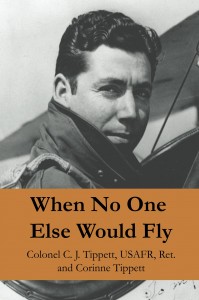
Pick a Genre and Stick With It: because readers do not generally leave their favorite genre to follow you, the author, to your next book. I muffed that one already. My aviation history biography is mysteriously not as interesting as I thought it would be to the fans of my family memoir chicken-raising homestead adventure. Aviation history fans love it – but chicken moms are meh. The income lies in an excellent and riveting series within a single genre.
Do All That While Still Writing All The Time: ah, jeez. (screeching tires on pavement sound.)
The unspoken, “and don’t quit your day job” was not as prevalent in these streams because many of the authors had actually quit their day jobs. These were the full-timers, the mid-listers and more who were making enough or more at self publishing for it to be their day job. So I was going to have to improvise in order to do all this while nurturing my day job.
My biggest challenge was going to be managing the time it takes me to write and self publish my books. The two I already have on Amazon, which sell even though I still need to market them, each took over a year to produce, and that’s too slow for where I want to be as an author – and what I want to earn.
I needed to find out How To Get More Efficient In My Writing And Self Publishing, and that answer was out there in the twitter stream as well.
Which brings us to SCRIVENER, and my next post.
Beautiful Hybrid
When I started with self publishing in 2009, I did it because I had a book I knew would sell if I could get it to market quickly. And it did, because I did.
There were a lot of traditionally published authors at that time telling us aspiring authors that self publishing was a “kiss of death” action. Do it and risk never being taken seriously by the traditional world.
I did it anyway, largely because I couldn’t get the attention of the traditional publishing world and again, I really believed in my book.
I had hoped that my book sales would later attract a traditional publisher, as has happened for some self-published authors. What I didn’t expect was for many of the traditionally-published authors to start coming over to self publishing, attracted by not only the book sales some self publishers are scoring, but also by the money.
Hear for yourself what these authors are saying – and what exactly the new word “Hybrid Author” means to them on the Rocking Self-Publishing Podcast by Simon Whistler. Episode 36 is particularly interesting as Beverly Kendall talks about the survey she completed last year studying what self publishers are earning.
We need new language for this new world of self publishing.
For one thing, we need to figure out if it is self publishing or self-publishing. I say it needs a hyphen when it describes, and otherwise should stand as two words.
There needs to be a different word for an author who owns her own ISBN and does it herself versus someone who accepts the ISBN from the upload site (do not accept the ISBN from the upload site), versus someone who buys a package from a “vanity” press site.
There are indie publishers, (independent publisher) which my kind of self-publishing business actually is, but if I don’t intend to publish work by other authors, I don’t feel that indie publisher is a fit – though I’ll use it anyway.
And I’d like a nice, encouraging piece of language to describe authors who are truly self published, and own their ISBN and have print and ebooks available – but aren’t yet doing it full-time because it isn’t yet earning full-time. Not a penalizing piece of language – an “on the way there” piece of language.
My wish list wouldn’t be complete with wanting a piece of language – preferably colorful – for the kind of author who self publishes crap – and another similar word for traditional publishers who publish crap. And a place to apply for a refund.
This picture would be ideal if it were a pile of vintage tools – or a typewriter.
The tools of our trade are important to us since tool-using defines us on some of the charts in biology classrooms across the globe.
These are the tools I currently use:
Writing & Research
- MS Word – but not for more than the first drafts. When I finished my first 100,000 word manuscript I learned why real writers don’t finish manuscripts in word. The program promptly froze, like all the gurus back then warned it would at 100,000 words, which is why they suggested leaving it in chapters instead of one big document. Maybe that doesn’t happen anymore, I wouldn’t know because I moved on to better things.
- InDesign –for the finishing steps. InDesign works well enough but only an expertly expert von-experto could rapidly turn out all the different output formats I needed for print book and multi-formats of ebook. Or a bunch of paid plug-ins which only work with paid subscriptions, etc. So I still use it but I am slow.
- Scrivener – (still testing it) Scrivener redefines flexibility. I suspect that if I make an effort to learn it thoroughly, it will cut my software struggling time into itty-bitty fractions and fuel my productivity.
- Filemaker Pro – to organize research and publishing business info, but mostly because I know it very well so I can quickly build custom databases.
- Evernote – for database functionality in a more user-friendly environment that is truly portable. I can update via mobile, which I can’t do to my Filemaker Pro files as easily.
- Excel – for all the things excel can do that nothing else can do as well in the business of writing, but also for organizing information and ideas.
- Snowflake – a beautiful piece of software created by a writer for writing which helps structure my characters, scenes, and story structure. It is also a writing guide as well as a writing tool.
Website & Blogging:
- WordPress – self-hosted on Bluehost, using only free themes until I find a paid theme that I can’t live without.
- GoDaddy & Bluehost & iPower & DomainIt – for domain purchases. I wish I’d stuck with just one domain site instead of buying from all over the place. I was trying to see how different the pricing and customer service was between providers and there is no real difference. I could transfer them all to one but don’t want to spend the time.
- Chrome – because Google knows where I live. I liked Firefox but liked Chrome better. I won’t even mention Microsoft Exploder. And Safari is lovely except that nobody will talk to it.
- HootSuite – easy to use and will cross-post to Facebook and LinkedIn, where Tweetdeck will only post to twitter. At least for me. It used to cross-post but I think I offended it by not tailoring each post to the specific platform.
- Flipboard – an app for iphone and ipad that makes watching my social media streams like reading a magazine. Flipboard enabled me to finally understand what twitter could do for my mission to self-educate.
Book Production:
- Createspace – because it’s Amazon, and has so much background support. I am looking at going to Lightning Source to see if Ingram will then pay attention to me, but we’ll see.
- Worzala – a book printer in the midwest USA who was willing to stray into short-run printing while the economy was still slow. They were very patient with my inexperienced self and I got a very nice short print run.
Other Stuff:
- Time versus Money – I do it myself whenever I can and still put out a professional product. If I don’t know how to do something, I take the time to learn. Except for cover creation and editing, there I spend real money.
- Living within my means – My goal of earning enough to cover my rent is going to be more achievable if my rent is low. I became debt-free due to disaster, but I’ve stayed debt-free due to personal choice. If my lifestyle is reasonable, then my day-job time can also be reasonable, leaving me room to write.
- Listening – to my readers, to industry gurus, to my family, to the heartbeat of popular culture, to podcasts, to Billy Idol (cuz he is so LOVELY – even now!)
And those are the tools that I use – missing only those that I’ve forgotten to list.
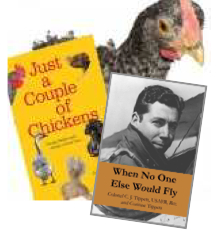
Two books is great… ten books would be better! But where does a not-full-time author find the time to write ten books?
This is my favorite question to hear from people. No, wait a minute, actually my favorite is “Have you lost weight?” only I don’t hear that one very often.
But I do hear “Where do you find the time?”
I used to answer “from ditching my TV-watching evenings” but then Breaking Bad came to Netflix and I lost the time I used to find there.
And then I used to answer “from all the time I’m not spending at the gym” but then people stopped asking if I’d lost weight… back to the gym.
So then I was left with some possibly controversial truths; that I find the time by not doing many of the things that other women are doing. Like driving the kids to soccer practice, or volunteering at the school, or separating whites from colors before (or after) washing, or decorating for the seasons, or keeping up with people’s birthdays. And that my children have daily chore lists that are at least as long as my own. And that I’ve never run, or even walked, a marathon.
Along with that admission, I have to emphasize that even with the time found by not participating in portions of the American Family Lifestyle – I still have to rely on My System:
Methodical organization, regular up-skilling in software and technology, relentless list checking, and constant time-management efforts – which are constant because I get regularly derailed like everyone else does.
I’ve had to build good habits for working because they didn’t come naturally. If there is a productivity how-to out there on tape, DVD, YouTube, Podcast, print, brochure, TV, or under my windshield wiper then I’ve adopted a piece of it. Rarely all of it because I burn out half way through and go back to writing, but every little bit helps.
And the most effective systems that I’ve set up for myself are carefully thought out procedure sheets that help me step through big projects with small tasks, organized for efficiency and increased productivity via layering.
This is the system that I am building for the How To Self Publish A Book series.
Because I really need it in order to Write, Publish, Repeat (these authors host one of the BEST podcasts that I’ve got loaded for my dishwashing, commuting, treadmilling time).